
One calendarthe whole family trusts
Google, iCloud and Outlook together, a colour for everyone, and the week on every screen in your home.
Works with
Your calendars
Every calendar, both ways
Edit in Famlet or in Google, Apple or Outlook, and it changes in both. School, club and holiday calendars come in too.
Google Calendar
Two-way. Choose which calendars to bring in.
Apple iCloud
Two-way, connected with an Apple app-specific password.
Outlook
Two-way, for work and personal accounts.
Calendar links
School, club and holiday calendars, checked every five minutes.
Who it belongs to
The school calendar lands in Mia’s colour, the work calendar in Sam’s.
Private
Work meetings show on the wall as busy, without the details.
Lock
Locked calendars are read-only: Famlet brings them in but never writes back.
Every view
See the week the way you need it
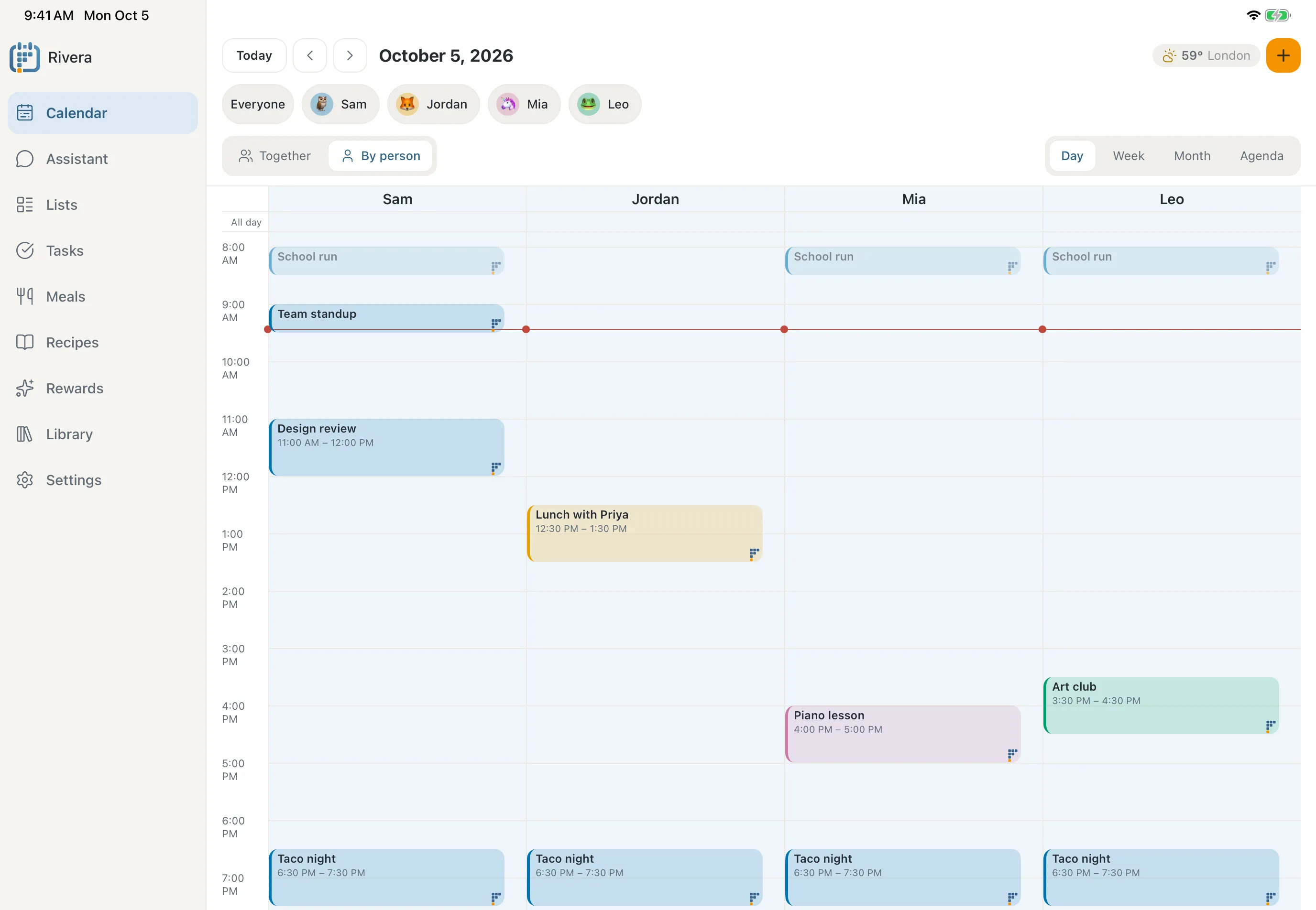
Day, week, month and agenda on every screen, with everyone together or a column for each person, plus three days at a time on the phone.
The whole family’s week, each person in their own colour.
Birthdays, trips and term dates at a glance.
Just what’s coming up, as a list.
On the phone, three days at a time.
The details families need
The small things that make a shared calendar work for a whole household.
One event, everyone in it
The school run is one event for Sam, Mia and Leo, never three copies.
Drag to reschedule
Move an event to a new time. For a repeating one, choose whether it moves just this once.
Repeats, including yearly
Weekly swimming, monthly bins and every birthday.
Reminders on your phone
A notification before it starts, so nobody’s late for swimming.
Routines and chores, right there
Today’s tasks sit beside the events, ready to tick off.
See tasks and routinesFind anything
Search by what an event says or who it’s for.
Share it with grandparents
A private link adds the family calendar to their own calendar app.
Ask the assistant
Or just say what needs to happen
Tell the assistant in your own words. With “Ask before changes” on, it prepares the event and waits for you to apply it.
Meet the assistantOn the wall
The week, where everyone walks past
Pair any tablet or browser with a code and the calendar stays up all day, in big type that reads across the room.
- Day, week, month or agenda
- Never a blank screen, even offline
- Private calendars show only busy times
Questions about the calendar
Which calendars work with Famlet?
Google Calendar, Apple iCloud and Outlook sync both ways. Any other calendar with a link, like a school, club or holiday calendar, comes in read-only and is checked for changes every five minutes.
Will Famlet change my Google calendar?
Only when you change one of its events in Famlet, the same as editing it in Google. Want a calendar left alone? Lock it, and Famlet brings it in without ever writing back.
Will I end up with duplicate events?
No. An event for several people is still one event, shown in each person’s colour. Moving it to another calendar moves it rather than copying it.
Can I keep work meetings off the wall?
Yes. Set a calendar to Private and the wall shows those times as busy, without the details.
What happens if I disconnect a calendar?
Famlet stops syncing it and removes its stored sign-in. Nothing in your Google, iCloud or Outlook account is deleted.
Do kids need their own accounts?
No. Kids are profiles in your family. Give them their own calendar or add them to any event, and it shows in their colour.
Can grandparents see the family calendar?
Yes. Create a private link and they can add it to Google, Apple or Outlook as a subscribed calendar. Choose whose events it shows, and replace or delete the link any time.

Bring the family’s week together
Connect your calendars in a few minutes and see everyone’s week in one place.